
Inventory management

Inventory Management Software

Know what you have, where it is and what it's worth. Northmast brings your stock levels, incoming purchase orders, stock value and stock counts together, so the inventory figures you work with are ones you can rely on.

Built for Shopify: Northmast works with the products, locations and stock already in your store.

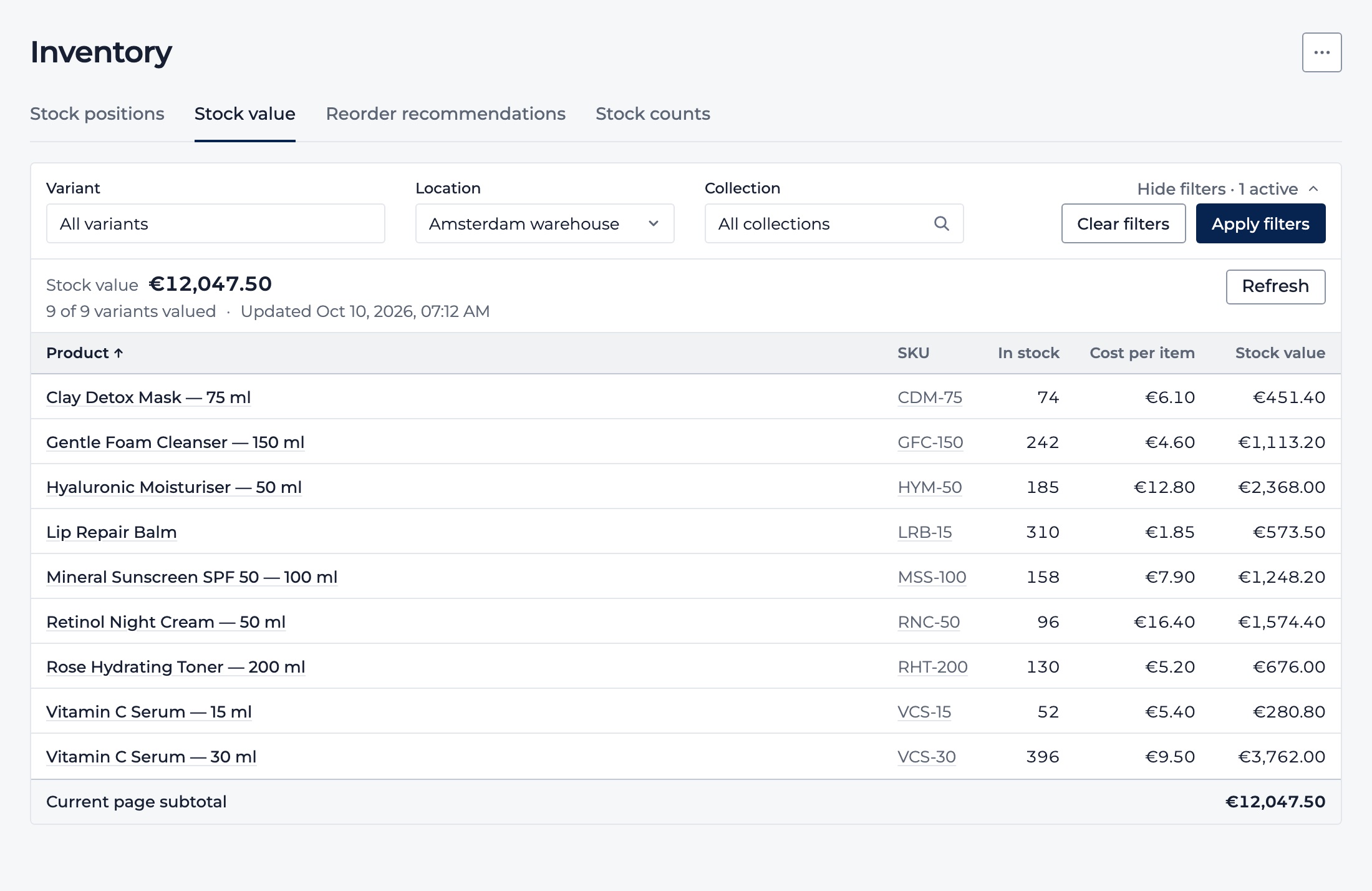
Stock value filtered to the Amsterdam warehouse: on-hand quantity, cost per item and stock value for each variant, with the total and the number of variants valued.
Stock value for one location at current cost, with demo store data.

The problem

When stock lives in five places, nobody trusts the number

Stock sits in a warehouse, a shop and maybe a pop-up. Shopify knows what it was told, but not what was damaged in transit, miscounted at delivery or is still on a supplier's truck. What your stock is worth gets worked out once a quarter in a spreadsheet. And when the count finally happens, nobody is quite sure which number to believe.

What you get

Inventory you can see, value and trust

  • See all your stock in one view

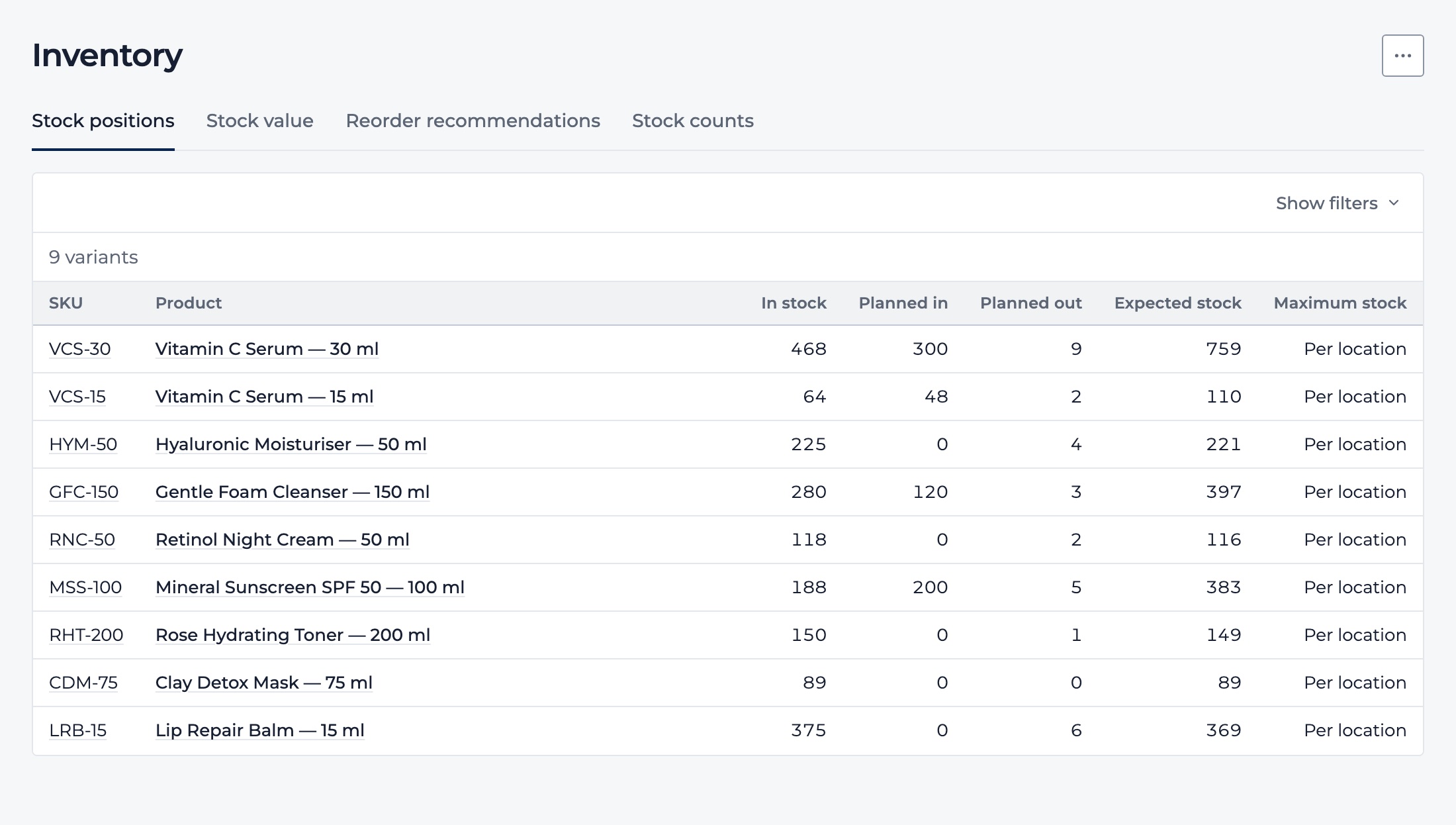
    Every variant shows what's in stock, what's already committed to customer orders and what's on its way from suppliers, added up across all your Shopify locations. You see the stock you'll actually have, not just what's on the shelf today. Search by SKU or name, or narrow it down to a collection.

  • Know what your stock is worth

    Northmast shows your inventory value at current cost in your reporting currency. See the total for the whole store, for one location or for one collection. Items without a cost are flagged and left out, never counted as zero, so you always know how complete the total is.

  • Count stock without the spreadsheet

    Choose what to count, print a count sheet and record what you find at each location. Northmast shows the difference with your records line by line. When you process the count, your Shopify stock is updated to match what's actually on the shelf.

  • Keep Shopify in step with your stockroom

    Receive a purchase order and the goods are added to stock at the right location in Shopify. Return goods to a supplier, or reverse a delivery booked by mistake, and they come off again. Nobody retypes numbers into Shopify, and Northmast only changes your stock when you receive, return, reverse a delivery or count.

  • Base decisions on figures you can rely on

    Your stock figures follow Shopify, and Northmast is open about how current and complete they are. When stock data may be behind, or a quantity or cost is missing, you see it straight away, instead of an outdated number or a zero that isn't real. Reorder and buying decisions start from numbers you can stand behind.

Stock positions for each variant across all locations: in stock, planned in from purchase orders, planned out to customer orders, and expected stock.
In stock, planned in, planned out and expected stock for every variant.

In practice

Example: 420 serums on record, 396 on the shelf

A skincare brand sells online from its warehouse and runs one city-centre shop. Its bestselling vitamin C serum costs €9.50 a bottle, and Shopify says there are 420 in the warehouse.

At the quarterly count, the team finds 396 on the shelf: 24 fewer than recorded, from a broken carton that was never written off. Northmast shows the difference line by line, and processing the count sets Shopify to 396.

From then on, the numbers match the shelf: the warehouse's stock value is €228 lower, online sales are based on stock that's really there, which lowers the risk of selling serums the team can't ship, and the next reorder recommendation starts from 396, not 420.

Example figures.
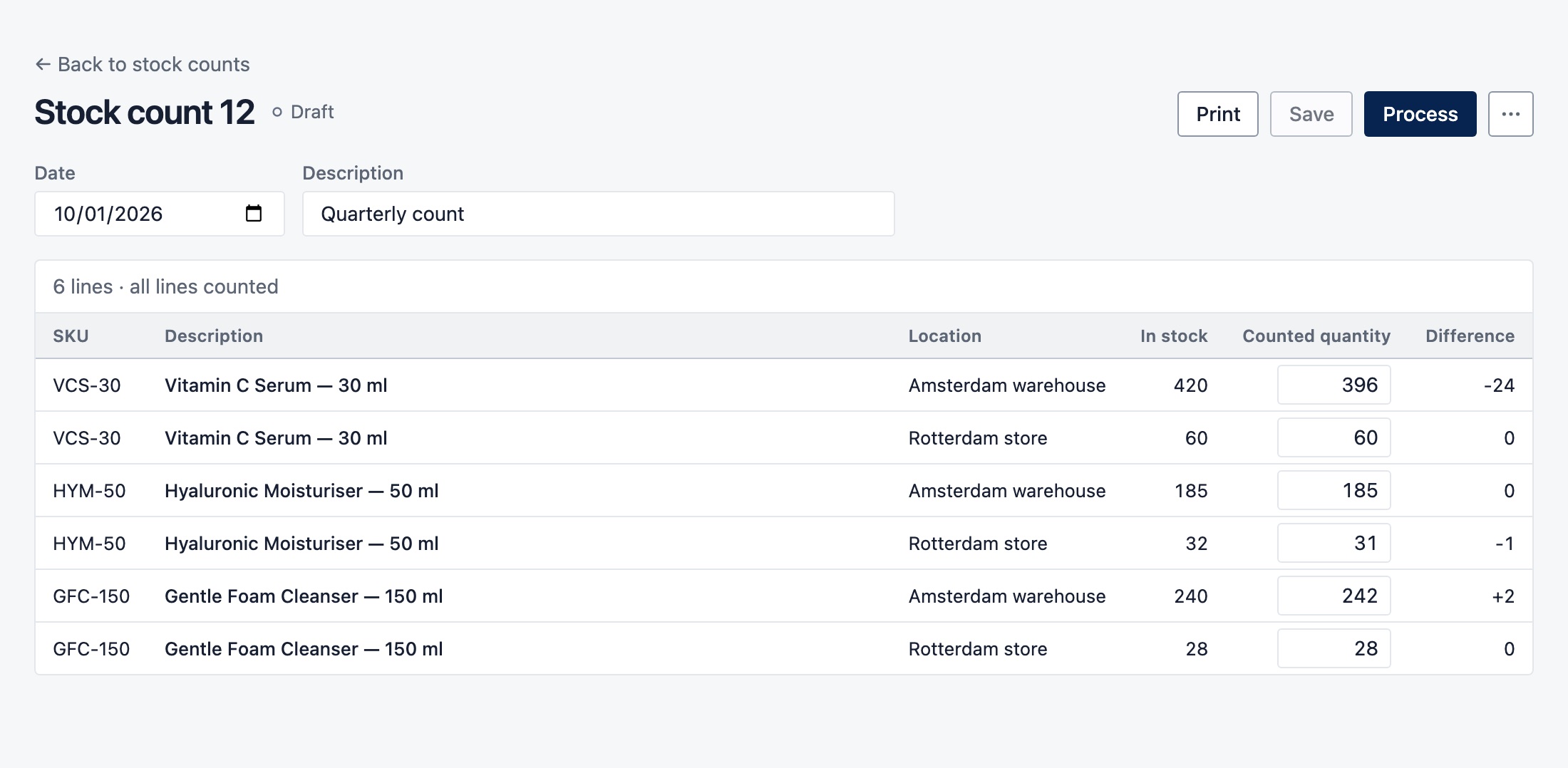
A draft stock count with in-stock and counted quantities per location, showing a difference of minus 24 for the vitamin C serum in the warehouse.
Counted quantities and differences per location, before Shopify is updated.

One connected app

Inventory connected to purchasing, reordering and your numbers

Stock doesn't stand on its own. It arrives through purchase orders, it drives what you reorder and it's money tied up in your business. In Northmast, all three work from the same stock figures, so you don't switch between tools to see the full picture.

  • Deliveries go straight into stock

    Receive a delivery against its purchase order and the stock is added at the location you choose, while the order shows what's still to come.

  • Reorder from the real numbers

    Reorder recommendations use the same stock, committed and incoming quantities, location by location. After a count, the next recommendation starts from what's really on the shelf.

  • Stock value next to revenue and margin

    Your daily Cockpit shows current stock value and how many products need reordering, alongside revenue and margin. You see what you sell, what it earns and what's sitting on the shelf in one view.

Purchase order management

Inventory replenishment

See the full product

Questions

Frequently asked questions about inventory management

What is inventory management software?

Inventory management software keeps track of how much stock you have, where it is and what it's worth, and helps you keep those records accurate. For ecommerce brands that usually means stock levels per location, stock on order from suppliers, stock value and regular stock counts. Many tools also connect to purchasing and reordering, so stock information is used to make decisions, not just recorded.

How do I track inventory across multiple locations?

Keep one stock record per location and make sure every movement updates it: sales, deliveries, returns and count corrections. Shopify already holds stock per location, so the hard part is keeping those numbers right and seeing them next to incoming orders and stock value. Northmast reads stock from all your Shopify locations, shows stock value per location and updates the right location when you receive, return or count stock.

How do I calculate the value of my inventory?

Multiply the quantity on hand of each item by its cost, then add everything up. Businesses use different cost methods, such as first in, first out (FIFO) or a weighted average, and your accountant may prefer one for your annual accounts. Northmast values stock at each item's current cost and shows the total in your reporting currency, flagging items without a cost instead of counting them as zero.

What is a stock count?

A stock count is a physical check of the products on your shelves, compared with what your system says you have. Many brands do a full count once or twice a year and count fast sellers or expensive products more often, known as cycle counting. The aim is to find differences early, before they lead to overselling or wrong reorder decisions. In Northmast, processing a count updates your Shopify stock to the counted quantities.

How do I keep my Shopify inventory accurate?

Book every stock movement as it happens and count regularly, so your Shopify stock reflects what's on the shelf. Northmast does this inside your Shopify store: received purchase orders are added at the right location, returns to suppliers and reversed deliveries are deducted, and processed stock counts set Shopify to the counted quantities. It works with the products and locations you already have in Shopify, so stock never has to be typed in twice.

What's the difference between inventory management and replenishment?

Inventory management is about the stock you have: how much, where and what it's worth. Replenishment is about the stock you'll need: what to reorder, when and how much. The two depend on each other, because every reorder decision starts from your current stock and what's already on order. If the stock figures are wrong, the reorder advice is wrong too.

Can I manage inventory and purchase orders in one app?

Yes, with software that combines stock management and purchasing, so orders and stock update each other. In Northmast, receiving a purchase order adds the goods to stock, returns to suppliers deduct them, and open orders show up as incoming stock and in reorder recommendations. Stock value and margin are in the same app, so you don't have to piece the picture together from separate tools.

What should I look for in ecommerce inventory management software?

Look for accurate stock per location, a clear view of what's on order, a stock value you can explain and a simple way to count and correct stock. Check that it works with your store platform and covers purchasing, so data isn't entered twice. And look at how it handles missing or outdated data: software that tells you when a number isn't reliable is worth more than software that always shows a confident figure.

Next step

Know what you have, where it is and what it's worth

Accurate stock for every location, a stock value you can explain and counts that correct your Shopify records, all connected to purchasing and your numbers.