
Inventory replenishment

Inventory Replenishment Software

Know what to reorder, when to order it and how much to buy. Northmast turns your sales pace, current stock, incoming purchase orders and supplier lead times into clear reorder recommendations you can act on.

Built for Shopify: recommendations for each product and store location, based on your own Shopify sales and stock.

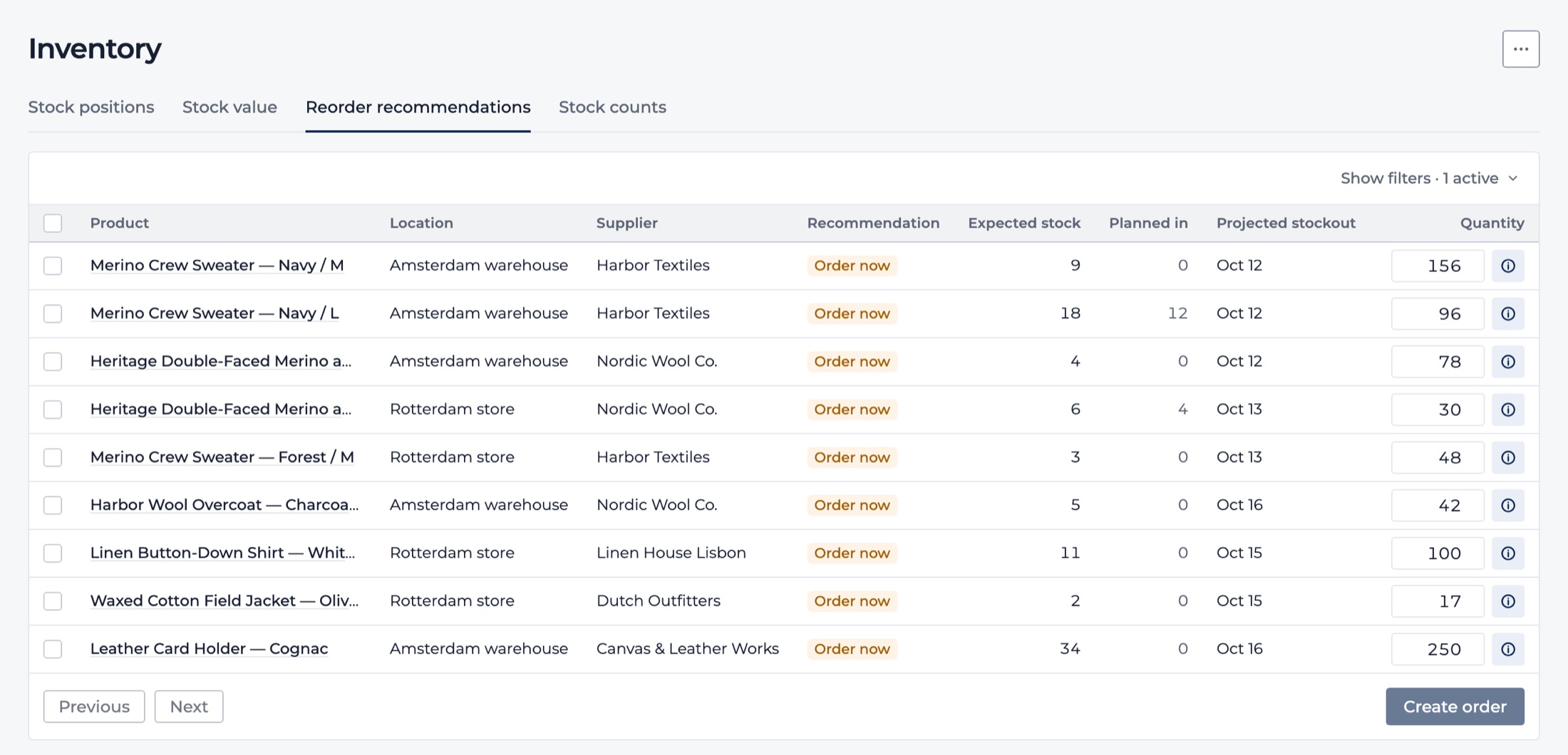
Reorder recommendations: proposed quantities per product, ready to turn into draft purchase orders.
Reorder recommendations, with demo store data.

The problem

Reordering on gut feeling gets expensive

Order too late and your bestsellers sell out while the next delivery is still weeks away. Order too much and slow movers tie up cash on the shelf. In between sit suppliers with different lead times, purchase orders that are already on their way, and a spreadsheet that's out of date the moment you save it. Most reorder decisions end up being made on memory and instinct, product by product.

What you get

Replenishment decisions you can make with confidence

  • See what needs reordering, at a glance

    Every product at every location is marked: order now, order by a specific date, or nothing needed yet. Filter by supplier or location, and see in your daily Cockpit how many products need ordering today.

  • Reorder at the right moment

    Northmast works out when stock will drop below the safety level you set, and how long each supplier takes to deliver. Make more informed reorder decisions before stock runs low, without ordering weeks earlier than you need to.

  • Buy the right quantity

    Recommended quantities top stock up to the days of cover you choose, and respect each supplier's minimum order quantity and order multiples, so suggestions arrive in full cases. Where you've set a maximum stock level for a location, Northmast stays within it.

  • Count what's already on its way

    Open purchase orders with an expected delivery date are part of every recommendation. Stock that's arriving next week isn't ordered again today.

  • Understand every recommendation

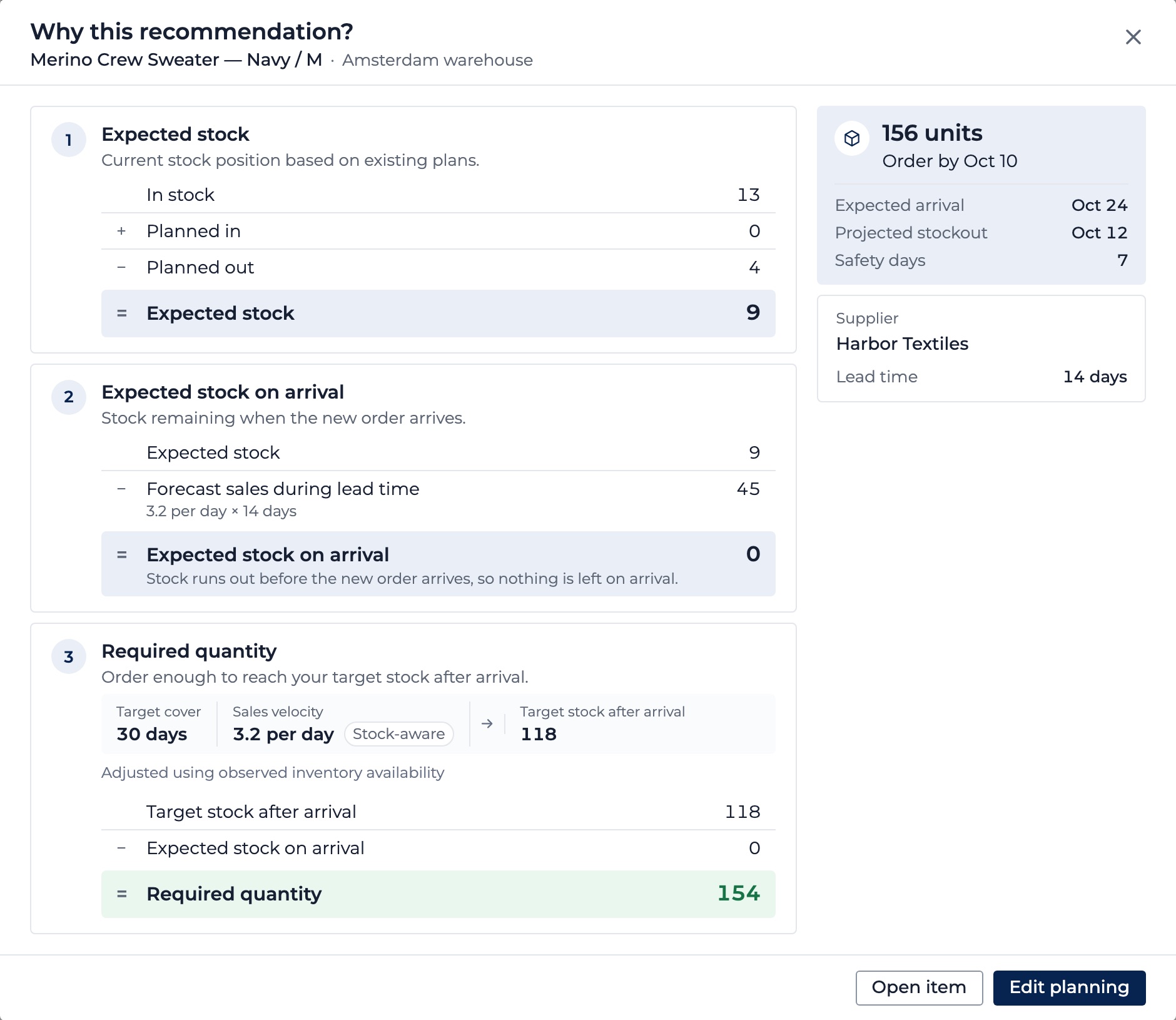
    Each suggestion shows the numbers behind it: sales pace, current stock, incoming orders, lead time and quantity. When information is missing, such as a supplier lead time, Northmast says what's missing instead of guessing a number.

The explanation behind one reorder recommendation: expected stock, sales during the supplier lead time, target stock and the required quantity, with the order-by date and supplier.
The numbers behind a recommendation, with demo store data.

In practice

Example: 150 mugs in stock, 100 on the way. Order now?

A homeware brand sells a stoneware mug at about six a day. There are 150 in stock, and 100 more are due in ten days from an earlier purchase order. The supplier needs three weeks to deliver and sells in cases of 25, with a minimum of 50. The team wants two weeks of safety stock and 45 days of cover after each delivery.

Looking only at the shelf, ordering today feels urgent: 150 mugs last 25 days, barely longer than the supplier's lead time.

Northmast counts the 100 mugs already on the way and recommends ordering 200 by a specific date, taking the incoming delivery into account: enough to reach 45 days of cover when the new delivery lands, rounded to full cases.

Leave the incoming order out, and the same calculation says: order 250, today. That's 50 more mugs, ordered earlier than needed.

When the order-by date comes, the team turns the recommendation into a draft purchase order for the supplier and carries on from there.

Example figures, checked against Northmast's recommendation logic.
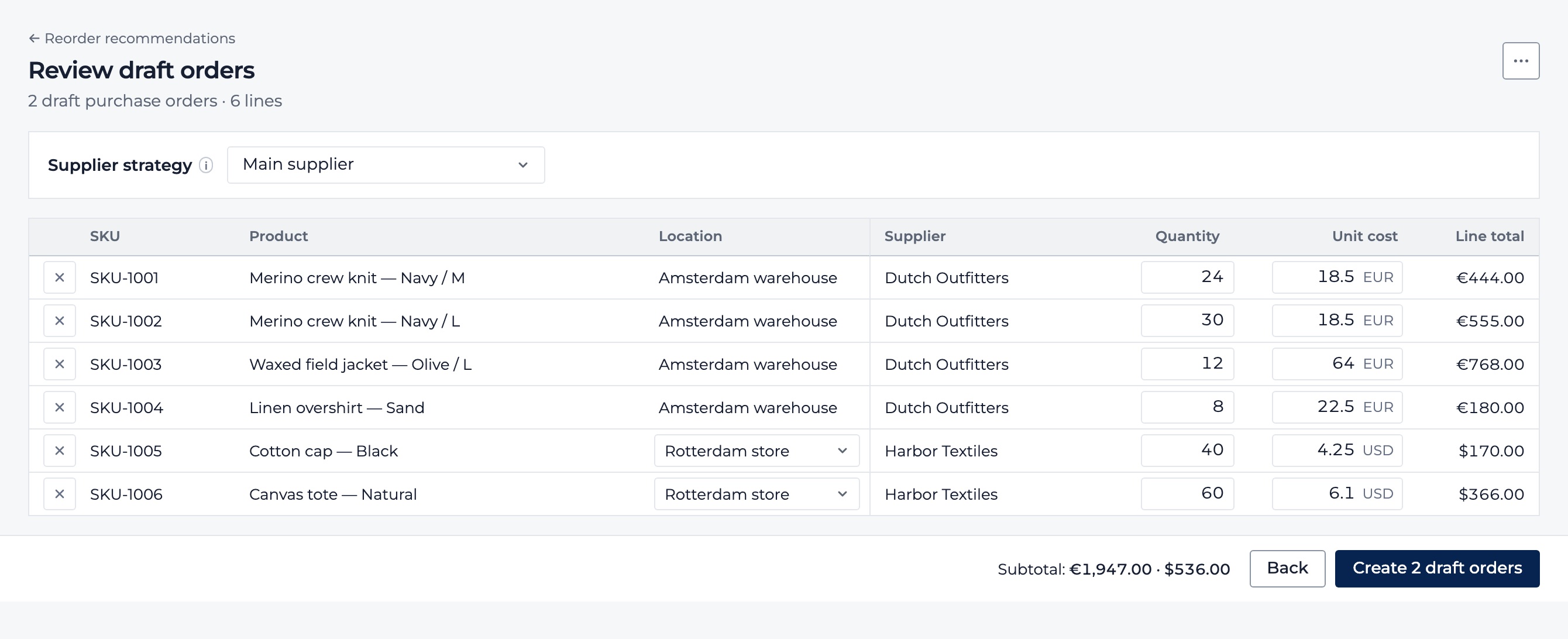
Reorder recommendations ready to become draft purchase orders per supplier, with location, quantity and unit cost per line.
Recommendations become draft purchase orders per supplier.

One connected app

Replenishment connected to your whole operation

A reorder recommendation is only as good as the data behind it. In Northmast, replenishment runs on the same products, stock, suppliers and purchase orders as the rest of your operation, so every suggestion reflects what's actually happening in your business.

  • Built on your real sales and stock

    Sales pace comes from what each location actually sold, leaving out days a product was out of stock, so a sell-out doesn't make demand look lower than it is. Stock levels follow Shopify, including goods you've just received.

  • From recommendation to purchase order

    Select the recommendations you want to act on, and Northmast prepares draft purchase orders per supplier and location. Choose the main supplier, the lowest price or the fastest delivery, then send and track the order.

  • Next to your margin and stock value

    Your daily Cockpit shows how many products need reordering alongside revenue, margin and stock value, so buying decisions are made with the full picture in view.

Inventory management

Purchase order management

See the full product

Questions

Frequently asked questions about inventory replenishment

What is inventory replenishment?

Inventory replenishment is the process of restocking products before they run out, deciding what to reorder, when to order it and how much to buy. Good replenishment balances two risks: running out of products customers want, and tying up cash in stock that sits on the shelf. For ecommerce brands it usually comes down to sales pace, current stock, stock already on order and how long suppliers take to deliver.

How do I know when to reorder stock?

Reorder when your stock is expected to fall below your safety level before a new delivery could arrive. That moment depends on how fast the product sells, how much you have and have on order, and your supplier's lead time. Northmast calculates this for every product and location and tells you whether to order now or by a specific date.

How much inventory should I reorder?

Enough to cover expected sales until your next delivery, plus a safety buffer, adjusted to what your supplier accepts. A common approach is to choose how many days of stock you want on hand after each delivery. Northmast tops stock up to that level, then applies the supplier's minimum order quantity and order multiples.

How do supplier lead times affect replenishment?

The longer a supplier takes to deliver, the earlier you need to order, because you're still selling while you wait. A product with a six-week lead time needs ordering far sooner than one that arrives in three days. Northmast uses the lead time for each supplier, or for a specific product, so every recommendation reflects how long that delivery really takes.

How does stock that's already on order affect reorder planning?

Stock on its way should reduce what you order now; otherwise you risk ordering twice. The key is knowing when it will arrive, because a delivery due next week counts very differently from one due in two months. Northmast includes open purchase orders on their expected delivery dates in every recommendation.

What should I look for in inventory replenishment software?

Look for software that bases its suggestions on your real data rather than fixed reorder points: actual sales pace, current stock per location, purchase orders already on their way and each supplier's lead time. It should respect how your suppliers sell, with minimum order quantities and order multiples, and show how each suggestion was reached. Finally, check how easily a recommendation becomes a purchase order. Northmast brings these together in one app, from the reorder decision to the purchase order.

Can I manage inventory replenishment in Shopify?

Yes. Northmast is a Shopify app that adds replenishment planning to your store: it uses your Shopify sales and stock per location to recommend what to reorder, when and how much, and combines those recommendations with purchase orders, supplier terms and profit reporting. The decision to reorder and the order itself sit in the same place, inside your Shopify admin.

Next step

Reorder with confidence

Know what to reorder, when to order it and how much to buy, based on your own sales, your stock and your suppliers.