
Purchase order management

Purchase Order Management Software

Plan what to order, send purchase orders to your suppliers, track every delivery and catch invoice mistakes, all connected to your inventory in one app.

Built for Shopify: Northmast runs inside your Shopify admin, with your own products, suppliers and stock.

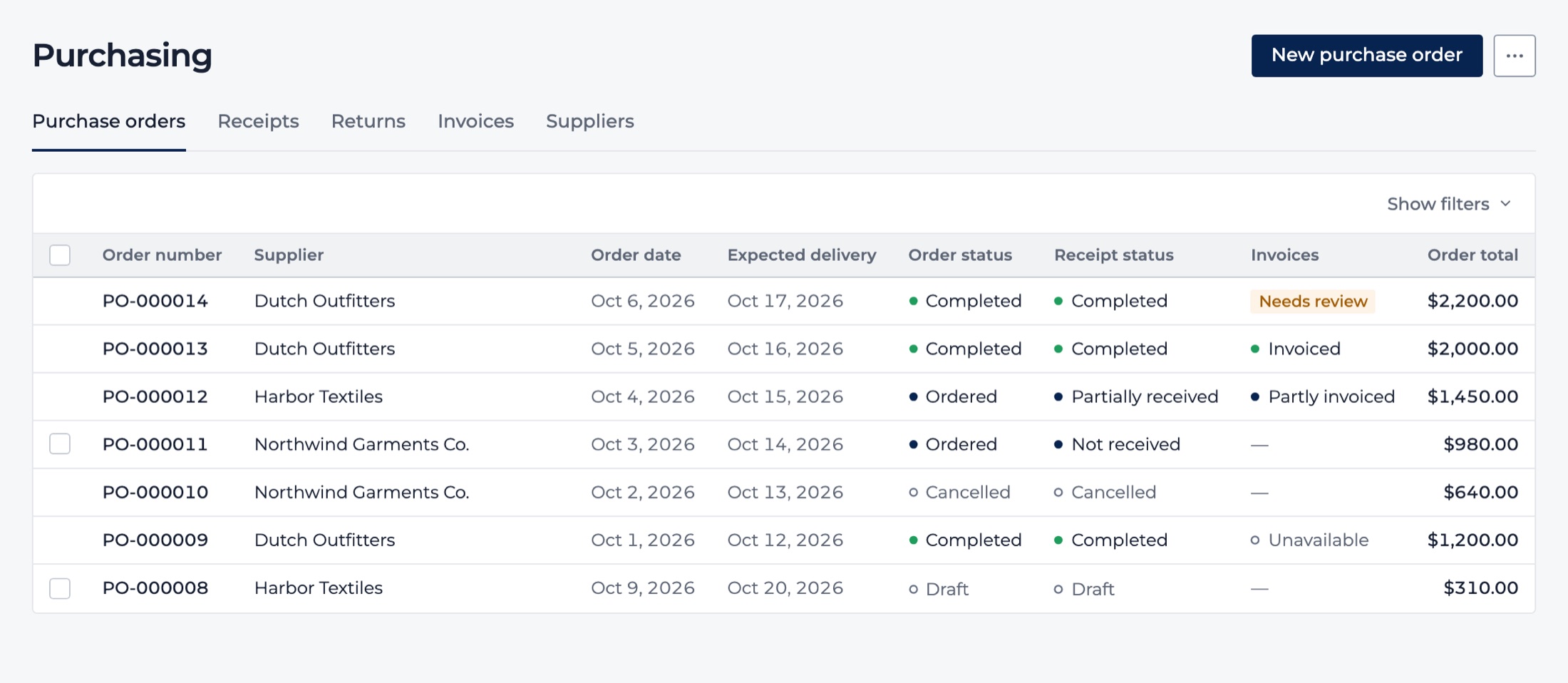
The purchase orders list: each order with its supplier, order date, expected delivery, order and receipt status, invoice status and total.
Purchase orders across suppliers, with demo store data.

The problem

Purchasing gets harder as you grow

With two suppliers, a spreadsheet and your inbox are enough. With ten, orders get lost between files and e-mail threads. Nobody is quite sure what's still on its way, partial deliveries are tracked from memory, and supplier invoices get paid without being checked against what actually arrived. Meanwhile, your stock levels and your purchasing live in different places, so every reorder starts with guesswork.

What you get

Everything you need to manage purchase orders and suppliers

  • Order the right stock, faster

    Turn reorder recommendations into ready-to-review purchase orders, grouped per supplier, with their prices, lead times, minimum order quantities and order multiples already applied. Check, adjust and place the order without rebuilding it in a spreadsheet.

  • Send orders your suppliers can work with

    Send each order as a clean, professional PDF by e-mail, straight from Northmast, from your own company domain if you like. Supplier replies land in your inbox, and you can see that the order was delivered.

  • Know what's coming in, and when

    See every open purchase order, its expected delivery date and what each supplier still owes you, across all suppliers at a glance. Partial deliveries stay visible until the last unit arrives, so nothing slips through.

  • Receive goods, and your stock follows

    When a delivery arrives, record it once. Northmast updates your inventory at the right Shopify location, so the stock is ready to sell without a second round of data entry. Returns to a supplier are handled the same way.

  • Catch invoice errors before you pay

    Northmast compares every supplier invoice you record with what you ordered and what actually arrived: quantities, unit prices, shipping and discounts. A higher price than agreed, more units than were delivered or an unexpected charge is flagged in money before you pay.

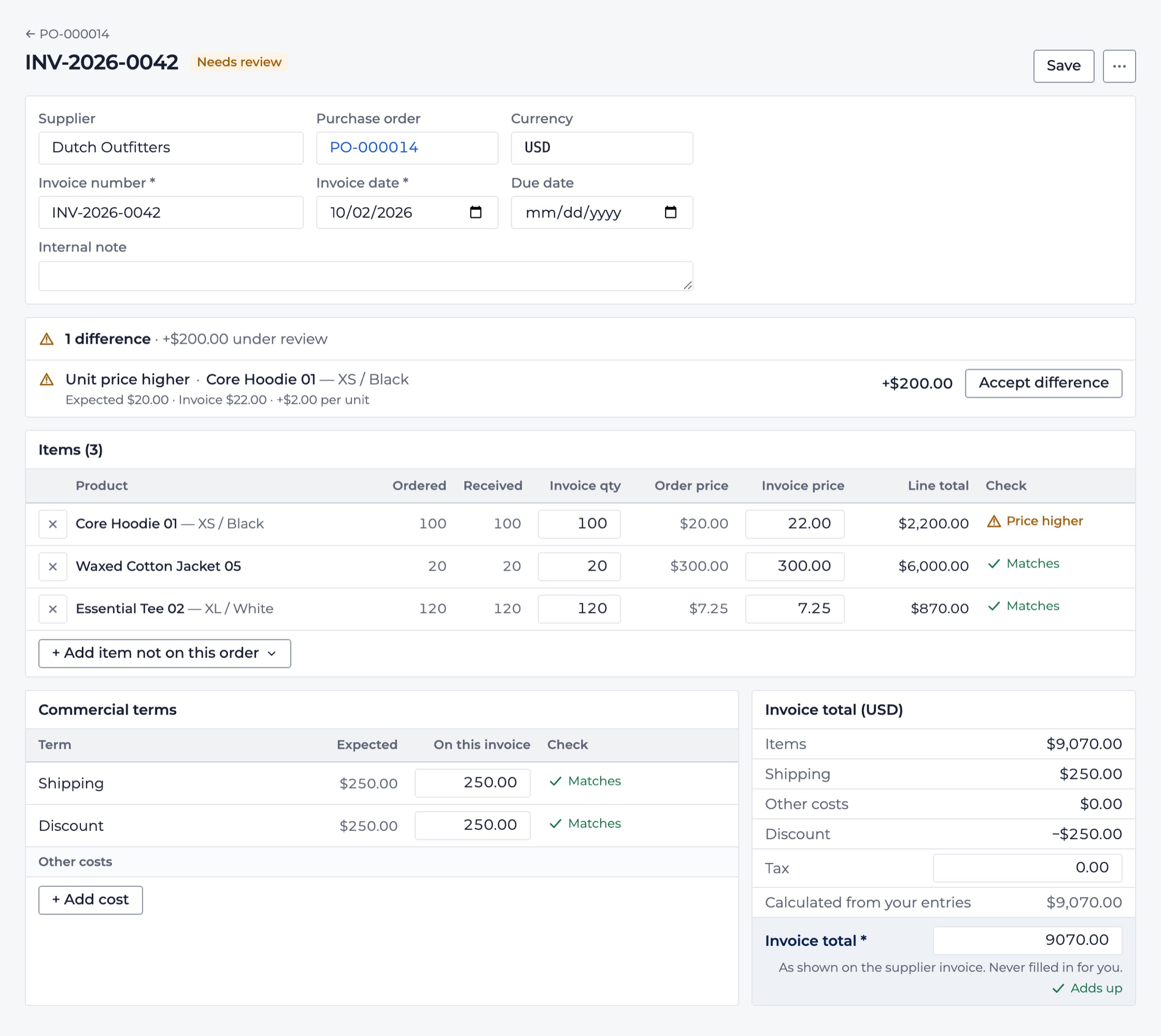
A supplier invoice checked against its purchase order, with a higher unit price flagged and the difference shown in dollars.
A supplier invoice with a higher price than agreed, flagged for review.

In practice

From reorder to checked invoice: 120 hoodies, one workflow

A clothing brand sells its best-selling hoodie through Shopify. Northmast notices that, at the current sales pace, stock will run low before a new delivery could arrive, and suggests ordering 120, already rounded to what the supplier accepts.

The buyer turns the suggestion into a purchase order, checks the agreed price of $20 and e-mails the order to the supplier, without leaving Northmast. From that moment the 120 hoodies count as on order, helping the team avoid a duplicate order.

Twelve days later, 80 hoodies arrive. They're received into stock and Shopify inventory goes up by 80. The other 40 stay visible as outstanding, so the buyer knows exactly what the supplier still owes.

Then the invoice comes in: 120 hoodies at $22 instead of the agreed $20. Northmast flags the $240 difference before it's paid.

One order, one place, from the first reorder signal to a checked invoice.

Example figures.
How reorder recommendations work

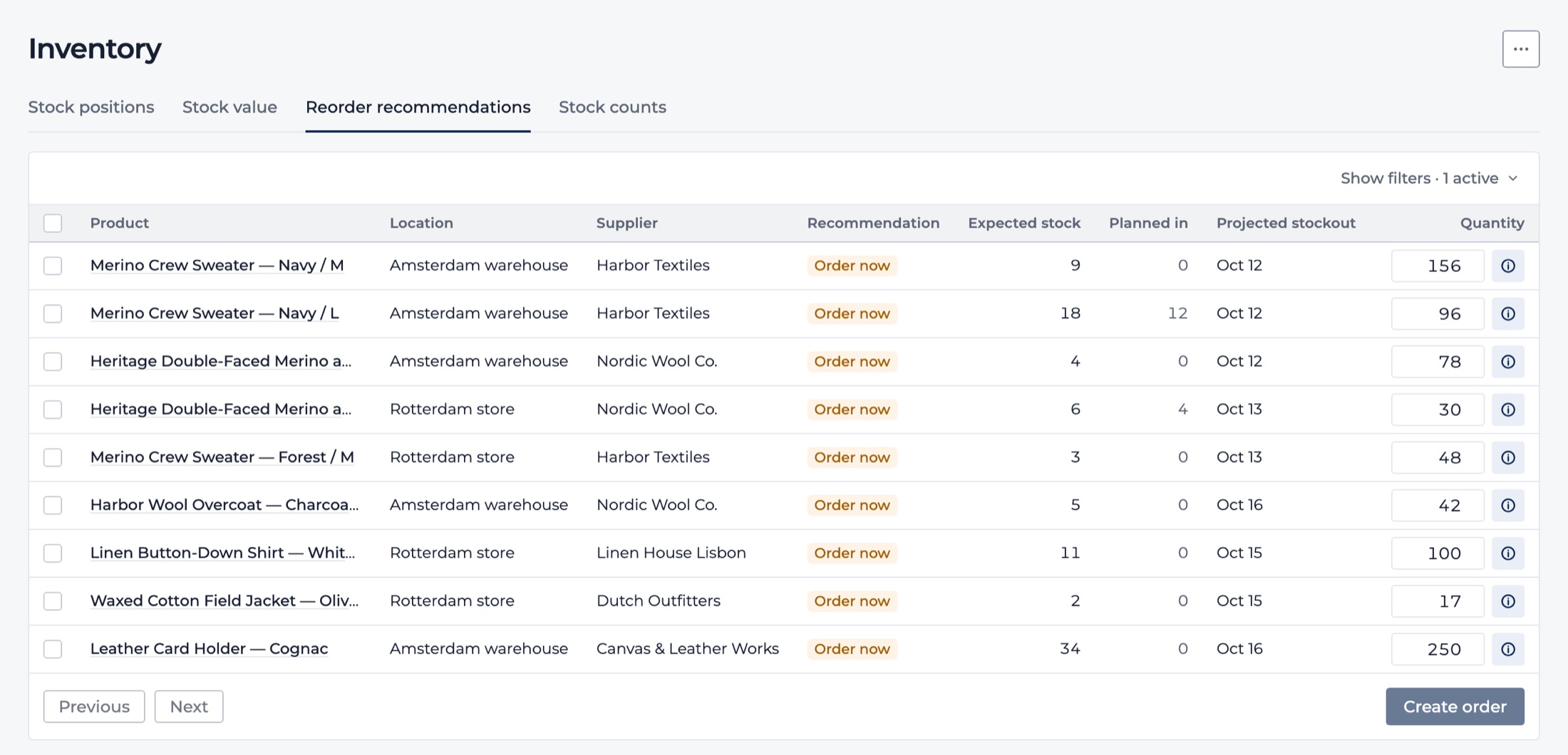
Reorder recommendations: proposed quantities per product, ready to turn into draft purchase orders.
Reorder recommendations, with demo store data.

One connected app

Purchasing, inventory and profit in one connected app

Plenty of tools can create a purchase order. The difference is what happens around it. In Northmast, purchasing, inventory, reorder planning and financial reporting share the same products, suppliers and numbers, so each part makes the others more reliable.

  • Your reorder plan knows what's already on order

    Open purchase orders with an expected delivery date are counted in your reorder recommendations, helping you avoid duplicate orders and last-minute reorders of stock that's already on its way.

  • Your stock stays accurate

    Receipts and returns update Shopify inventory as they happen, and your stock overview shows what's still inbound from suppliers.

  • Purchasing sits next to your numbers

    Your daily Cockpit shows open purchase orders and units on order alongside revenue and margin, so buying decisions are made with the full picture in view.

See the full product

Questions

Frequently asked questions about purchase order management

What is purchase order management?

Purchase order management is how a business creates, sends and tracks the orders it places with suppliers, from deciding what to buy until the goods have arrived and the supplier's invoice has been checked. A purchase order records what was agreed: products, quantities, prices and an expected delivery date. Managing them well means knowing at any moment what's on order, what has arrived and what you still owe.

Why is purchase order management important for ecommerce businesses?

Inventory ties up significant cash for many ecommerce businesses. Without a clear view of open purchase orders, you risk ordering stock twice, missing a late delivery until products sell out, or paying an invoice for goods that never arrived. Good purchase order management protects your cash, your stock availability and your supplier relationships, and it becomes more important with every supplier and product you add.

What should I look for in purchase order software for an online store?

Look beyond creating the order itself. Useful questions: Does it help you decide what to order? Can you send orders to suppliers directly? Does it handle partial deliveries? Does receiving goods update your store's inventory automatically? Can you check supplier invoices against what you ordered and received? And does it connect to your stock and margin figures, or will you be copying data between tools?

Can I manage purchasing and inventory in one platform?

Yes. Many brands use separate tools for stock, purchase orders and planning, which works but means keeping them in sync by hand. In Northmast, purchasing and inventory share the same data: receiving an order updates your Shopify stock, open orders are counted when you plan the next reorder, and stock value and margin sit in the same app.

How can I keep track of incoming stock from suppliers?

Record an expected delivery date on every purchase order and log each delivery as it arrives, including partial ones. That gives you a running view of what each supplier still owes and when it's due. In Northmast, open orders and their outstanding quantities are visible across all suppliers, and incoming stock is also shown in your stock overview.

How does purchase order software help prevent costly mistakes?

Most purchasing mistakes come from information in the wrong place: ordering what's already on its way, forgetting the rest of a partial delivery, or accepting an invoice with a higher price than agreed. Software that links orders, deliveries and invoices catches these early. Checking each invoice against both the order and the delivery is known as three-way matching. Northmast does this for every supplier invoice you record.

Can I manage purchase orders for my Shopify store?

Yes. Shopify includes purchase orders in its admin, and apps add more of the workflow around them. Northmast is a Shopify app that combines purchase orders with reorder recommendations, supplier e-mail, receiving into Shopify inventory, supplier invoice checks and profit reporting, so purchasing and inventory are managed together rather than in separate apps.

Next step

Take control of your purchasing

Know what you've ordered, what's on its way and what you're paying for, with purchase orders connected to your stock, your reorder planning and your margins.